Visualising Embedding Spaces
- Converting text into embeddings lets us run basic maths to find semantically similar text.
- To assess how well these embeddings work, we can visualise them in a vector space.
- A visualisation can helps us distinguish between projection errors and embedding errors.
A local news website is publishing an article titled "Main Street closes for weekend food festival". At the bottom is a "related stories" panel, and the editor is considering three options: "Roadworks to close Main Street for three weeks", "Riverside food market returns this Saturday" and "Thousands attend summer food festival". Each shares something with the new article, but in different ways. One concerns the same street, another is a nearby food event, and the third covers a similar festival that has already happened.
There isn't one best choice until we decide what "related" means; only then can we rate which article is the closest match. We could ask an editor to select every recommendation, but the website publishes many articles each day. Instead, let's turn some of this information into numbers, compare articles automatically, and make these similarities visible so we can see how our comparison system is doing.
Turning Articles into Points
We start with a very simple system to find the most similar article. We'll read each complete article and manually score two things: the scale of the local event and the severity of the travel disruption. Each gets a score from 0 to 5, using the same scoring rules across all articles. They describe the event and disruption themselves, rather than how much space the article gives to each.
| Article | Event Scale | Disruption Severity |
|---|---|---|
| Main Street closes for weekend food festival | 3 | 2 |
| Roadworks to close Main Street for three weeks | 1 | 4 |
| Riverside food market returns this Saturday | 2 | 1 |
| Thousands attend summer food festival | 4 | 1 |
Each pair of scores gives us a vector: an ordered list of numbers. We can plot event scale on the horizontal axis and disruption severity on the vertical axis. The straight-line distance between two points, called Euclidean distance, tells us how closely their scores match.
But we might want something different: the same balance between event size and disruption, regardless of scale, or a preference for larger events. To see these differences, let's draw each vector as an arrow from the origin, where both scores are zero.
Moving directly towards or away from the origin changes the arrow's length without changing its direction — both scores grow or shrink in the same proportion. Moving around a circle centred on the origin does the opposite: the length stays the same, but the direction changes. This changes the balance between event scale and disruption severity. We call the arrow's length its magnitude, and compare directions using the angle between the arrows.
So, do we want matching scores, a similar balance between the scores, or a preference for higher scores? These are different questions.
Dot Product vs Cosine Similarity
The dot product multiplies matching coordinates and adds the results. It uses both direction and length, so a longer arrow can get a higher score even if it's less closely aligned. Here, length comes from our event-scale and disruption-severity scores.
Suppose the selected article scores (2, 1). One candidate also scores (2, 1), while another scores (4, 2). The second candidate has twice the numerical scores while keeping the same balance. Their dot products with the selected article are 5 and 10 respectively, so the dot product favours the higher-scoring candidate rather than the identical one.
That could be useful if we deliberately want higher event-scale and disruption scores to count in a candidate's favour. But if we want matching scores, Euclidean distance is more appropriate. The dot product rewards alignment and length; it doesn't reward matching lengths.
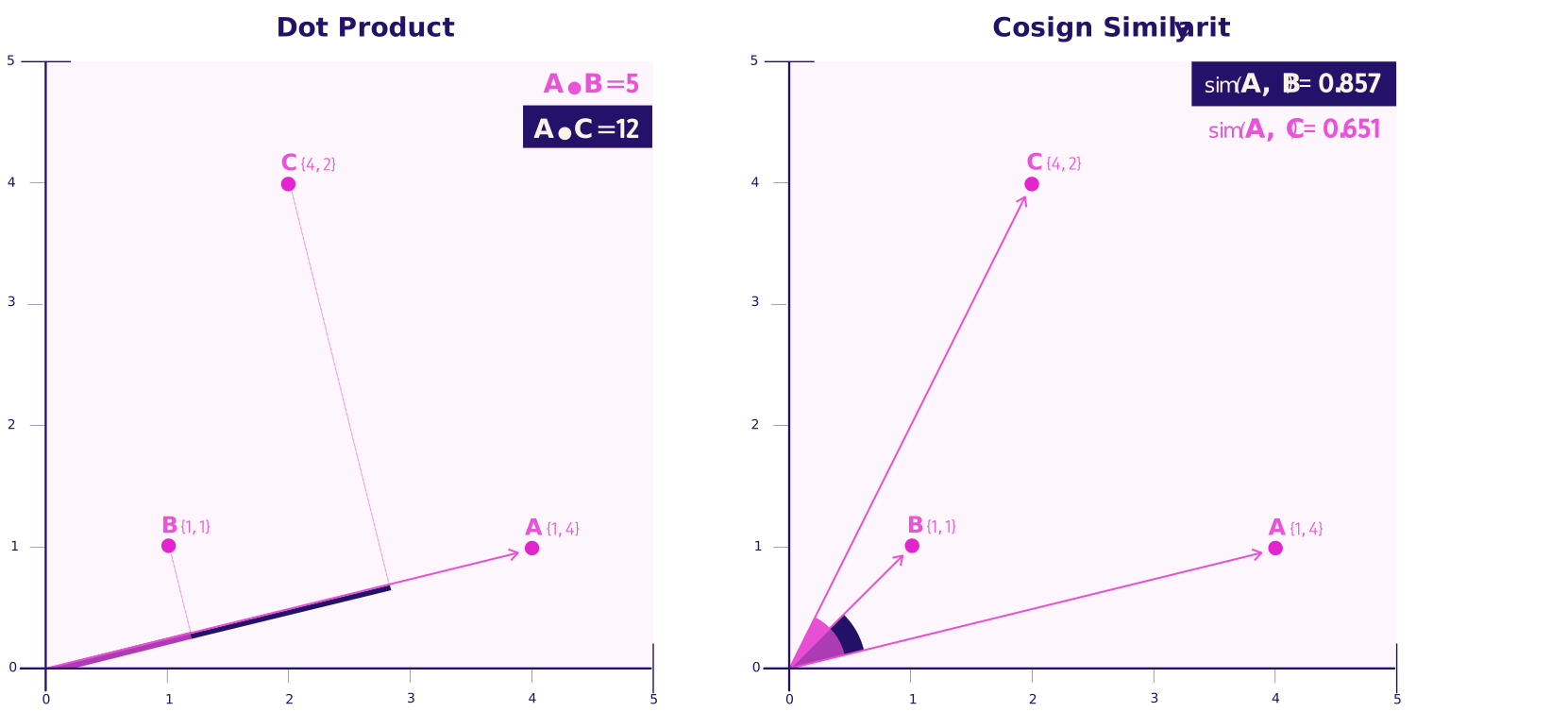
Cosine similarity removes the effect of length by dividing the dot product by the product of the two arrow lengths. The result depends only on the angle between them. Our (2,1) and (4,2) candidates therefore receive the same score because they point in the same direction. We would use cosine if we wanted a similar balance between event scale and disruption, without preferring higher scores.
From Manual Scores to Embeddings
Two scores alone make our system a bit too simple. They don't tell us whether an event involves food, music, or sport. We could keep adding features, but manually scoring every article would take time, and different editors would score them differently. An embedding model instead learns numerical representations from training examples, rather than relying entirely on features we name ourselves. This means we can score articles fast and consistently, and we can also capture features we haven't even thought of yet.
Many text-embedding models first divide the text into tokens: words, parts of words or punctuation. A Transformer processes them together and produces a vector for each token, taking the surrounding text into account. "Market" may use the same token in "food market" and "housing market", but receive a different vector because its meaning differs. Pooling then combines these token vectors into one vector for the text.
A tool like Sentence Transformers handles the tokenisation and the steps needed to create embeddings, and provides functions for comparing them. It does not automatically divide long articles into meaningful sections. If an article exceeds the model's input limit, it may cut off text, so we need to split it into sections ourselves.
We should also check how the model expects to compare vectors. For example, OpenAI returns embeddings already scaled to length one — this is called normalisation. For those vectors, cosine and dot product give the same rankings, so switching between them would not change the recommendations.
Visualising and Debugging Embeddings
Once we have article embeddings, we can compare each article with the others and recommend those with the highest cosine similarity. But related articles still won't be perfect, so we need an overview to see what is going on.
We can't visualise our points in 2D directly, so we need to use a projection. PCA finds new axis directions that capture the most variation in the data — I covered this in Visualising Potentially Redundant Capacity. But it'll never be perfect; points that look close on the map may not be as close in the full dimensions, so we can only use this to indicate where problems might be.
To check the map, select an article and draw lines from it to its neighbours in the original high-dimensional embeddings. Then highlight any nearby points that were not originally neighbours — these are false map neighbours: the projection made them look close. A trustworthiness score quantifies this problem, penalising more when an apparent neighbour was actually far down the original neighbour ranking. We can compare projections using this score, but it doesn't tell us whether the recommendations are useful.
Now we can hover over a point, see its title and its neighbours' titles, and check that they are indeed similar articles without opening every page. It might help us spot at a glance where something might be in the wrong place.
Let's colour the points by the editorial section they belong to: Transport, Community, Food and drink. This lets us compare the editorial labels with the relationships shown by the embeddings. We should expect some overlap. A story about a new bus route to a food market could reasonably sit between Transport and Food and drink, so an article appearing near another section is not automatically a mistake. But we can hover over them to double-check.
Once we find an unsuitable recommendation, we should first check a few things:
- Was any of the text cut off, or did we accidentally include extra text?
- Are the embedding and similarity functions configured correctly?
- Does a different embedding model get better results?
We could also test a reranker: a second model that reads both articles together and scores how relevant they are to each other. We should judge whether it helps using editor-checked examples, rather than assuming its answer is correct.
One Article, Multiple Topics
Pooling combines the token vectors into one text vector. Some models average them, while others use different methods. Either way, one vector may not preserve every topic equally well. A music-festival article might describe the performers in one section and road closures in another. Representing them together could produce weaker concert recommendations than the music section alone, and weaker traffic recommendations than the road-closure section alone.
We can investigate this by splitting the article into paragraphs and embedding each paragraph separately, using the same model as the other articles. A map can then help us compare their neighbours. If the music and transport paragraphs find different useful matches, we could keep separate section embeddings and recommend the article through either subject. We should not automatically discard an unusual paragraph: it may contain important information.
Combining Ranking Signals
Similar meaning is not the only thing that matters. A report about a food fair five years ago may be closely related but unhelpful for readers looking for upcoming events. We can give candidates separate scores for meaning, location and timing, put those scores on comparable scales, then combine them using weights. Sliders let us change the weights and see the recommendation order change. They should not move points on the unchanged semantic map. To identify upcoming events, we need the event date, not just the publication date.
For our panel, we might choose to recommend nearby upcoming events with a similar scale and level of disruption. But we need to measure those requirements explicitly; semantic similarity alone does not guarantee them. Our visualisations help us inspect the matches and see how each score affects the ranking. We can then test changes against recommendations the editor considers useful.